![You suck at protoshop. No, you [i]really[/i] oo.](http://blog.gg8.se/images/you-suck-at-photoshop-you-really-do-your-awful.png)




How to patch LSDj to use an inverted palette
March 4th, 2012This article was originally posted on September 19th, 2009 and has now been revised to use BGB instead no$gmb as a debugger. However, the things described here are mostly irrelevant now, because the standard method of installing a backlight these days is with a biversion, i.e. a hardware inversion. It may still be interesting for educational purposes.
Yesterday Three years ago axolotl asked on 8bc whether it is possible to invert the monochrome palette in LSDj, for use with backlit screens with an inverted polarizing foil. And it’s very much possible to do, and it’s even possible to modify an existing ROM image. So, I’ll show you how I did it using a copy of the LSDj ROM, BGB, and optionally a hex editor. I’m using XVI32, but any hex editor would do.
The palette value is change by a hardware register, which is a place in memory that a Gameboy program can be write to, to change things. So I look it up in the Pan Docs, which is a manual to the Gameboy hardware. Let’s look in the section LCD Monochrome Palettes. There we see that the address is $ff47 in hexadecimal and how the value is constructed.
For this tutorial, right click the BGB window and choose options (or press F11), go to system and choose the Gameboy option. This will run the ROM in DMG mode, which is needed to find where the palette change happens. Open the ROM image, press esc to go to the debugger and open Debug>Access breakpoints and enter FF47 and make sure “on write” is checked. This tells the BGB to track any writes to that address so we can find the place where the palette is initialized and change it.

Click ok and press F9 to begin execution. (Or reset the emulator)

BGB stops and show a bunch of machine instructions. The interesting part is the instructions at 019C and 019E. The instruction at 019C takes the hexadecimal value $E4, stores it in the CPU register A then writes it to the hardware register $FF47. This is the code we’re looking for. The value $E4 is the standard palette. Go back to pan docs and check again how the value is constructed.
Then let’s split the value into its individual colours.
$E4 = 11 10 01 00
11 is the lightest palette value and 00 is the darkest. Since want to invert the palette we’ll reverse the order.
00 01 10 11 = $1B
Great. You may now right click the line at 019C, choose modify code and enter ld a,1B. The line that said ld a,E4 should now say ld a,1B. Choose run, reset to confirm that the palette is inverted and that LSDj doesn’t crash or anything. You may now go to file, save ROM as and save the file anywhere you want, preferably with a new file name.
Alternatively, you can use a hex editor to edit this value. This part of the tutorial was left unchanged from the first version, because no$gmb can’t save changes made to a ROM and thus needed a hex editor to modify the file.
Open the hex editor and replace the $E4 at position 019D with the value $1B. This address will vary depending on LSDj version.
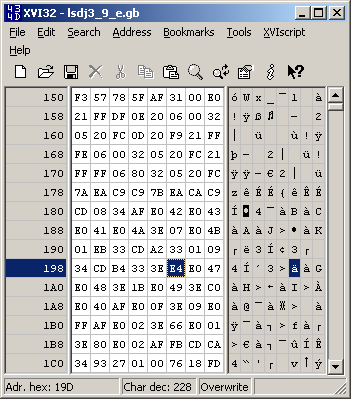
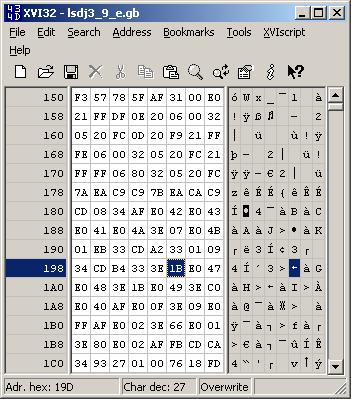
Lastly, open the ROM in an emulator to confirm that the modification worked.
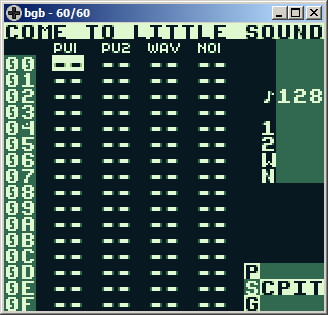
Enjoy the inverted palette.

September 19th, 2009 at 4:01 pm
[...] as cores do LSDJ O Game Boy Genius tem um excelente artigo sobre como alterar a paleta de cores do LSDJ. Eles usam a ROM do programa para fazerem as alterações. Vale a pena uma vista de [...]
September 19th, 2009 at 5:56 pm
Thanks a bunch nitro2k01! I got it working thanks to you.
September 19th, 2009 at 6:28 pm
axolotl: Could you please take a photo of normal vs inverted palette on your screen? I’ll feature it here as a comparison. (But please make them as sharp as you can.)
September 19th, 2009 at 8:06 pm
I’ll try to get ahold of a camera for you. As soon as I do I’ll get some pics!
September 21st, 2009 at 5:32 pm
What makes this tutorial extra tasty is the fact that you explain how to figure out how to change the palette instead of just a quick answer.
September 21st, 2009 at 7:38 pm
So do you have this for say version 3.9.9 available?
I’ve always wanted to do this… but don’t know shit
September 22nd, 2009 at 6:50 pm
You can use a hex editor and replace the same byte. As long as the byte at $019D is $E4 it should be safe to replace it with $1B this should work for nearly all version of LSDj, except maybe the oldest of old ones.
October 21st, 2009 at 12:41 am
I did this and it worked perfectly in my gameboy. I don’t have backlite neither any mod, so the screen is the original. it helps a lot in visualizing.
October 31st, 2009 at 3:06 am
Hey nitro,
I finally got pics of the two, check out the original post for them! Sorry I took so long..
November 2nd, 2009 at 4:57 am
[...] How to patch LSDj to use an inverted palette [...]
November 27th, 2009 at 1:19 am
[...] How to patch LSDj to use an inverted palette [...]